
OpenAPI Documentation Platforms Compared: Mintlify, GitBook, Velu Docs and Document360
I compared some of the best documentation tools for modern API documentation support so you don't have to, and here is my honest feedback
There is no shortage of documentation platforms today. Mintlify, GitBook, ReadMe, Stoplight, Fern, Document360, Velu and several others all promise to help teams publish better developer documentation.
Looking to build a career in technical writing? Connect with me for a free 1:1 consultation or get my course and book on AI Native technical writing.
https://topmate.io/harshit_satyaseel
At first glance, many of these products seem to do the same things. They can turn an OpenAPI file into endpoint pages, display request and response schemas and give developers a way to try an API. But the differences become clearer when you look beyond the feature list. For example,
- How much work does it take to get an API reference published?
- What happens when the API changes?
- Can the documentation stay in sync with the source specification?
- What does the experience look like for the developer who needs to use the API?
There is another question that matters more now than it did a few years ago:
How well does the documentation work with AI coding tools?
Many of the developers I talk to increasingly use tools such as Cursor and Claude Code to understand unfamiliar code, explore APIs and build integrations. They expect these tools to find relevant documentation and use it as context while they work. An API documentation platform therefore needs to serve two audiences:
- The developer reading the reference
- The coding assistant retrieving information from it.
Features such as Model Context Protocol (MCP) support and machine-readable documentation can help. But an MCP connection alone does not make documentation useful to an AI assistant. The underlying API specification still needs to be accurate, the reference needs to explain the API clearly, and the retrieval experience needs to return the right information.
That is the problem I wanted to explore.
I compared Mintlify, GitBook, Velu Docs and Document360 using the same fictional Notes API contract. The comparison covers how each platform handles OpenAPI, what it produces for developers, how teams can maintain the reference and how the platforms fit into AI-assisted development. Pricing is part of it too, because a tool can have an impressive feature set and still be difficult to justify for a small API team.
This is not a general review of documentation platforms. The focus is API documentation: the path from an OpenAPI specification to a published, maintainable reference that developers can actually use.
What makes a good API documentation platform?
An API reference is not useful just because it lists every endpoint. A developer needs to understand what an operation does, what information to send, how authentication works and what to expect in return. They also need to know whether the example on the page reflects the current API.
That means we need to evaluate more than the appearance of the generated pages. The comparison looks at the following parts of each platform:
- OpenAPI support: Can the platform import an existing OpenAPI or Swagger specification? Does it support the formats the team already produces?
- Generated reference: Does it create useful endpoint pages with methods, paths, descriptions, parameters, request bodies, responses and schemas?
- Authentication and examples: Are security schemes represented clearly? Can developers understand the request and response without having to decode the specification themselves?
- Interactive testing: Can a developer try an operation from the reference, and what configuration is needed to make that work?
- Navigation and models: Are operations grouped in a useful way? Can developers find shared schemas without hunting through individual endpoints?
- Maintenance workflow: Can the team update the reference through Git, a URL, a CLI or a repeatable CI/CD process?
- AI access: Can compatible coding assistants retrieve the documentation through MCP or another machine-readable interface?
- Cost: What does a team need to pay to get the API documentation workflow it actually needs? General knowledge-base management, blog publishing, support portals and ticketing are outside the scope. Those may matter when choosing a wider documentation system, but they do not tell us how well a platform handles an API contract.
Get my Full AI Native technical writer kit here:
https://satyaseel.gumroad.com/l/lugozs
The test: one OpenAPI contract across four platforms
To keep the comparison consistent and fair, I used the same OpenAPI 3.1 specification for a small Notes API which I created. The contract described four operations:
| Operation | Purpose |
|---|---|
POST /auth/token |
Create an access token |
POST /sessions |
Create a session |
POST /sessions/{session_id}/end |
End a session |
GET /sessions/{session_id}/note |
Retrieve a note |
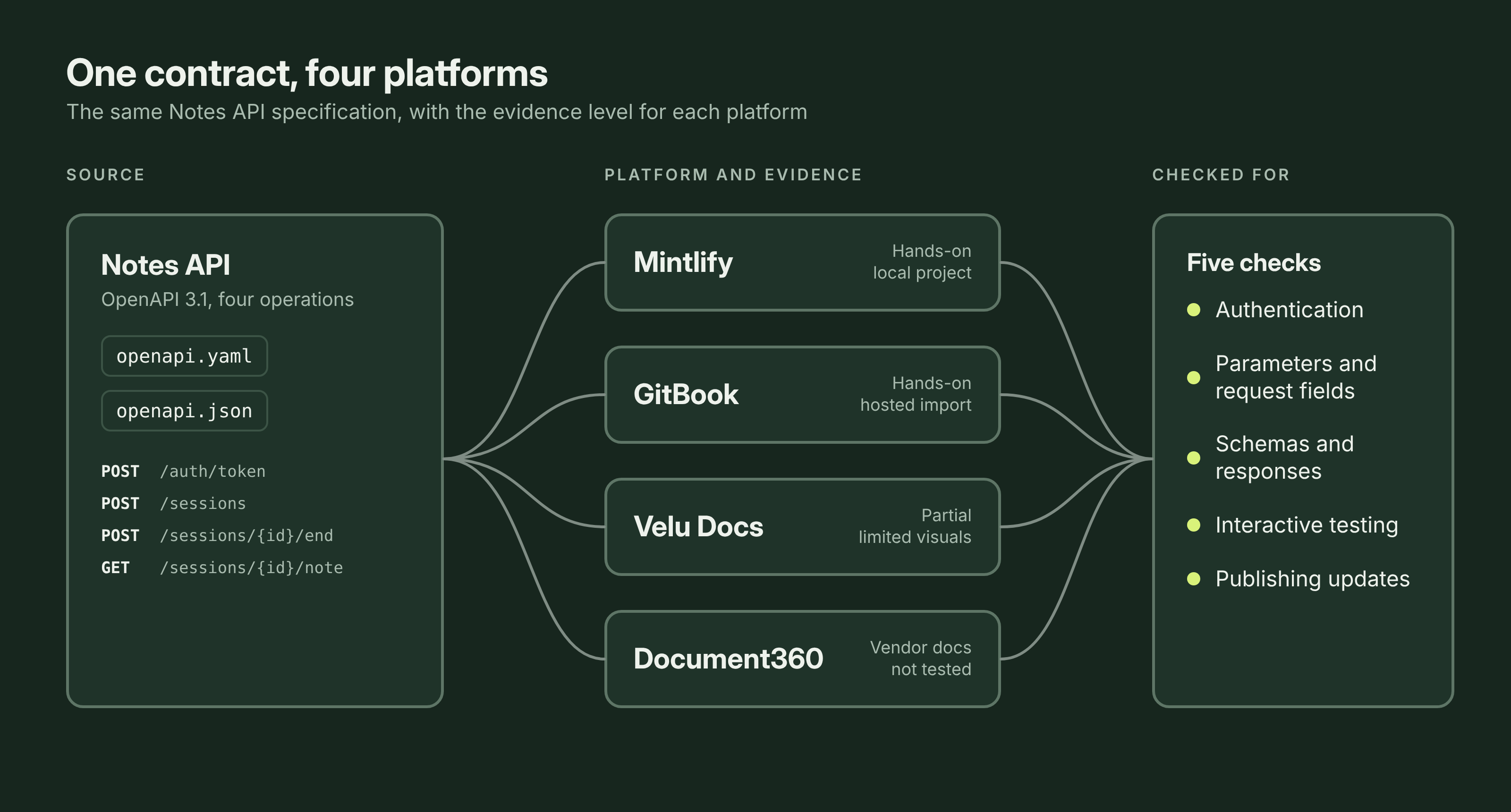
The contract exists in both openapi.yaml and openapi.json. They represent the same API, but using both formats makes it possible to see whether a platform fits a team's existing build output or expects a particular file format.
For each platform, the available workflow was followed to connect the specification and generate the reference. The rendered pages were then checked against the source contract for authentication requirements, parameters, request fields, schemas and response details. The interactive testing experience and the steps needed to publish updates were part of the check as well.
The amount of hands-on evidence is not the same for all four platforms, so the distinction matters:
- Mintlify: Tested in a local project, with screenshots of the guides and a complete Create Session API page.
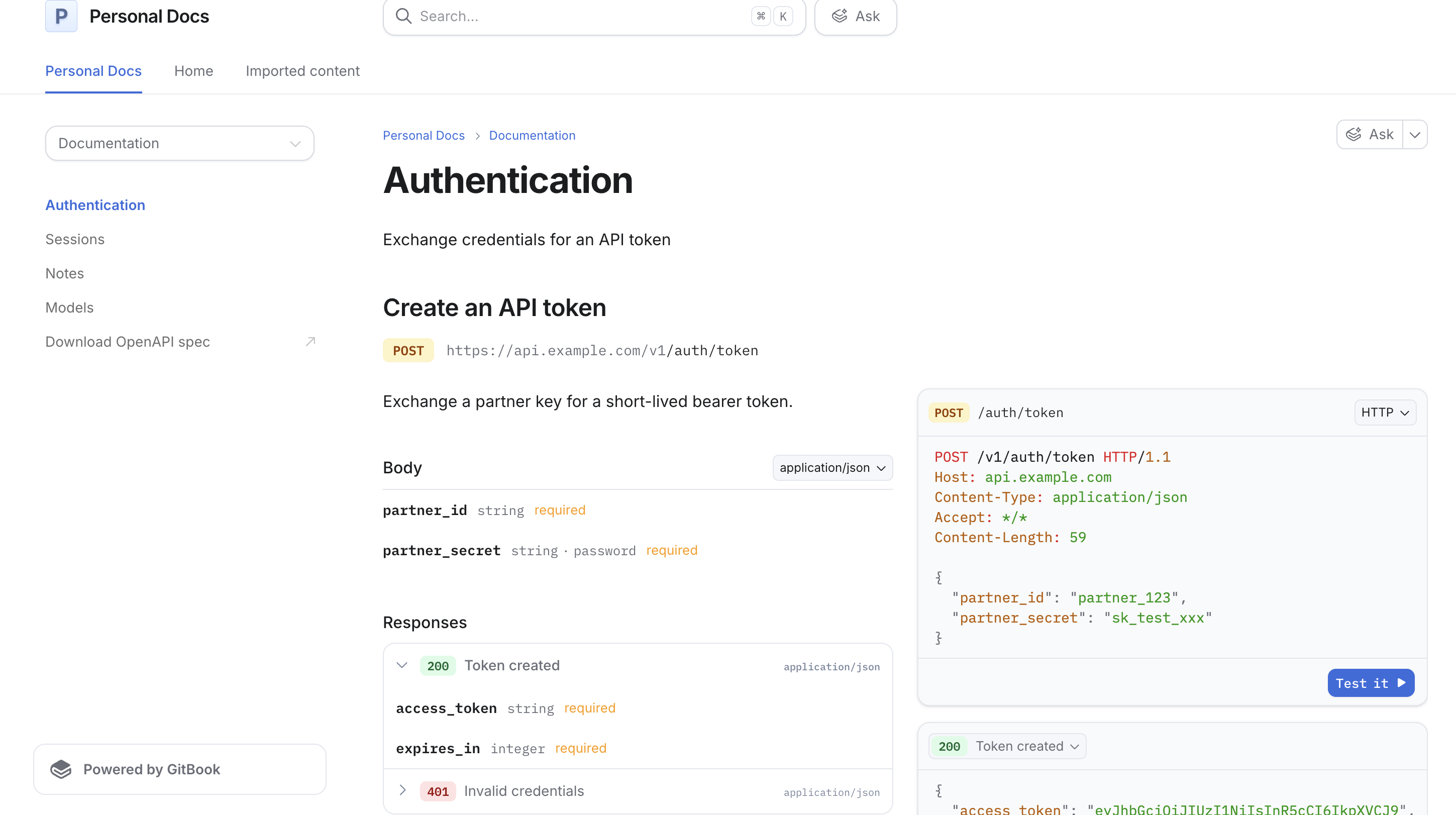
- GitBook: The API reference was generated and published, with the Authentication, Sessions, Notes and Models sections captured.
- Velu Docs: A local project was connected to the OpenAPI file through
velu.json, and the generated endpoint pages were tested along with the guide workflow.- Document360: The same self-serve test could not be completed, so no generated endpoint pages were captured from a project of my own. The findings in that section are based on Document360's published product documentation. I will call out those differences rather than present every feature as something I personally tested. A feature described in vendor documentation is useful evidence, but it is not the same as a hands-on result.
Mintlify: A Git-based workflow for teams that maintain their API contract in code
I am a pro Mintlify user from the past 2 years, so I know this end-to-end. But I will explain this as some one who is new to this.
Mintlify follows a docs-as-code model. The OpenAPI file lives in the documentation repository, and the site configuration points to that file. The reference is generated as part of the documentation project rather than managed as a separate API product.
For the Notes API, the project needs the specification and an API Reference tab in docs.json:
{
  "tab": "API Reference",
  "openapi": "openapi.json"
}
The Mintlify CLI then validates the project and starts a local preview:
npm i -g mint
mint validate
mint dev
The setup was straightforward once the documentation project was in place. There was no separate API workspace to configure. The OpenAPI file remained the source for the generated reference.
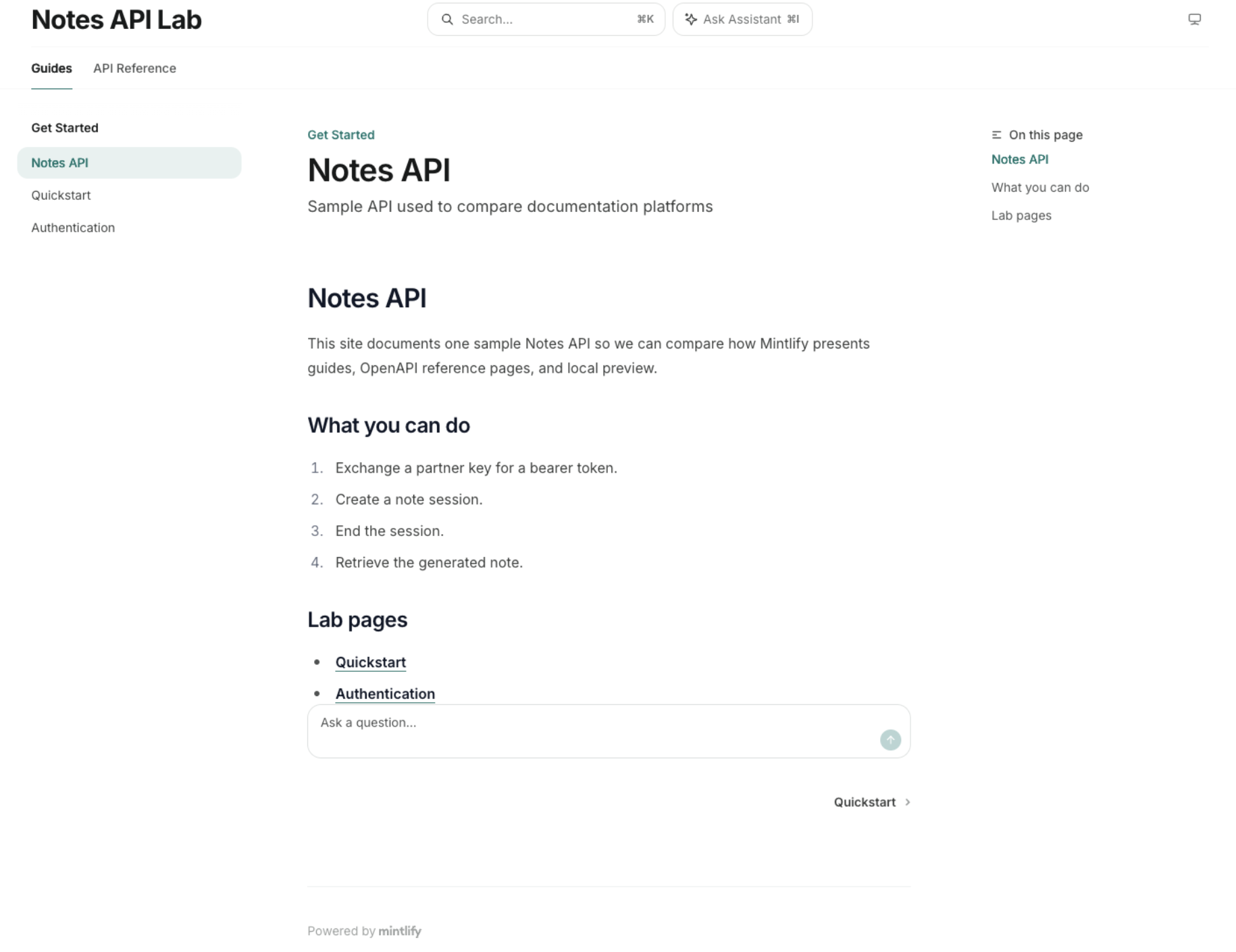
The generated reference
The Create Session page displayed the HTTP method and path, operation description, bearer-token authorization, request-body fields, required markers, enum values and nested metadata. It also showed response fields, a cURL request and an example JSON response in the side panel.
The page used a three-column layout: navigation on the left, the operation reference in the middle and request or response examples alongside it. The OpenAPI tags grouped operations under Authentication, Sessions and Notes.
In Mintlify you can directly try any API endpoint from it's UI, which in my opinion is really handy. It's useful because a developer can move from reading the operation to testing it without switching to a separate tool.
Mintlify does a really good job as the rendered contract stayed close to the OpenAPI source. That is the main strength of the workflow and this tool: the reference is generated from a file that can remain under version control and you can build an automation on top of it the way I wrote in this blog.
Get my latest API documentation course. Learn how to use AI to produce reliable API documentation, and build agents that keep your docs up to date on their own.
https://satyaseel.gumroad.com/l/tlapqh
Where the workflow fits
The biggest advantage of Mintlify is the connection between the API specification and the publishing process. If the API team updates the OpenAPI file in Git, the documentation project can pick up the change through its normal build and publishing workflow. An automated watcher or agent can update the file, validate the project and trigger a build. The team does not need to repeat a manual upload every time the contract changes.
This approach is a natural fit for teams that already review API changes through pull requests and want documentation updates to follow the same process.
The generated page also included the reference details I would expect developers to need: authentication, required fields, nested objects, response examples and interactive testing.
What to consider
In this test, Mintlify was set up as a documentation project, which means working with the repository structure, a configuration file and the CLI. That is a reasonable trade-off for a team already using Git, but it is more setup than uploading a file into a hosted interface.
Mintlify is not Git-only, though. It also offers a web editor that commits changes back to the repository, so writers who do not work in Git can edit in the browser. That route was not part of this test, which started from a local project.
It is also important to separate the API reference workflow from the wider Mintlify product. The API playground is not limited to the expensive plan. Mintlify's Free plan includes an API playground, so a team should not assume it needs Pro just to publish an interactive API reference.
Mintlify makes the most sense when the repository is already the center of the documentation workflow and the team wants the API reference maintained alongside the code, with a browser editor available for contributors who prefer it.
GitBook: The quickest way to generate the API reference from UI
Mintlify and GitBook can both be driven from a repository and from a browser. The two tests simply started at different points. Where Mintlify began as a local project, GitBook began in the hosted product, where the specification is imported and the result is published. No separate project had to be set up before the generated API reference appeared.
The workflow was short:
- Open the OpenAPI area in GitBook.
- Choose the option to add a specification.
- Upload
openapi.yaml. - Add an OpenAPI Reference section for that specification.
- Publish the space.
GitBook generated the reference pages from the uploaded file. Of the four workflows evaluated, this was the quickest hosted integration.
The generated reference
GitBook created Authentication, Sessions, Notes and Models sections from the Notes API contract.
The reference included the token operation, the Create Session operation with its bearer authentication and request fields, and the Get Note operation with its session_id path parameter. It also created a Models section containing shared schemas such as TokenRequest, Session, Note and Error.
The pages included a Test it control. GitBook also provided a way to download the OpenAPI specification from the sidebar, so the source contract was easy to retrieve.
The generated pages matched the parts of the Notes API contract that were checked. The Models section was particularly useful because shared types had a visible home rather than appearing only as references inside individual endpoint pages.
Where the workflow fits
GitBook's main strength in this test was how quickly a file became a published reference. For a team evaluating API documentation platforms, uploading a YAML file is a simple way to get started. The generated output included operations, shared models, interactive testing and access to the original specification.
The hosted import does not mean a team has to rely on manual uploads forever. GitBook supports a docs-as-code approach as well. Git Sync works in both directions with GitHub and GitLab, so content can be edited in the app or in a repository, and GitBook lists it on every plan, including Free.
For the specification itself, GitBook also supports URL-based and CLI publishing options. Those options give teams a path to automate updates after the initial setup.
What to consider
The workflow that was tested was upload-first, so the Git, URL and CLI routes were not exercised. If your API specification lives in a monorepo and changes as part of every release, you will need to connect that process to GitBook through its supported sync or publishing options and confirm how the update behaves with your own file.
That is not a problem with the generated reference itself. It is a question of where the team wants to start. In this test, Mintlify began from the repository and GitBook began from the browser, but each platform offers the other route as well.
GitBook is a strong option when the priority is to turn an existing OpenAPI file into a browsable API reference with very little initial setup.
Velu Docs: A configuration-led workflow with built-in AI outputs and a free plan
Velu and Mintlify are too similar and uses a configuration-led workflow that will feel familiar to teams that have worked with docs-as-code tools. You add the OpenAPI file to the project and point the API Reference tab in velu.json to it.
The project configuration was set up as follows:
{
  "tab": "API Reference",
  "openapi": "/openapi.json"
}
The Velu CLI initializes and validates the project:
npx @veluai/velu init notes-api-docs
npx @veluai/velu validate .
npx @veluai/velu dev
Velu follows a spec-driven workflow where it reads the OpenAPI file, groups operations by tag, creates a page for each operation and provides a Try It playground feature as well.
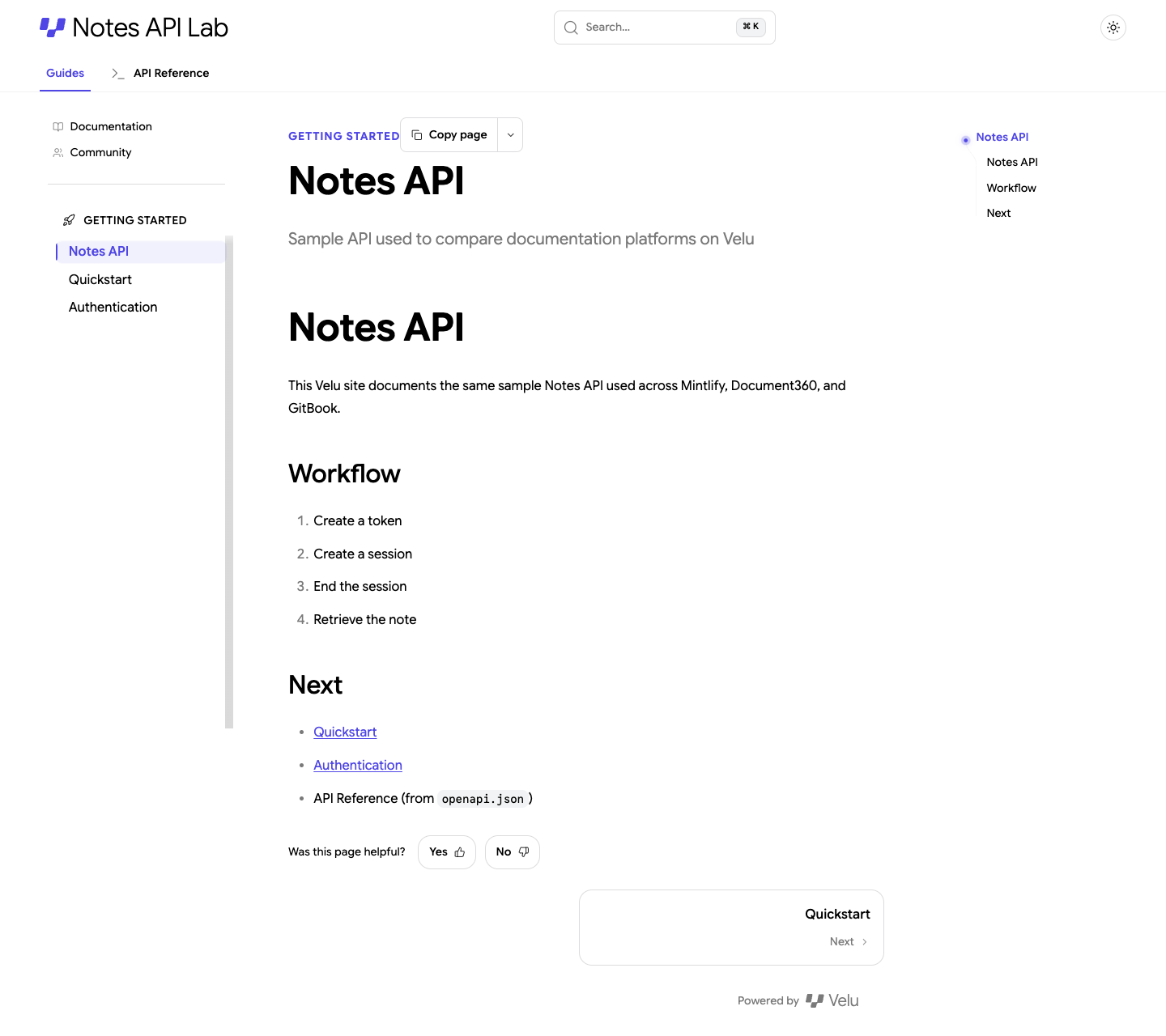
How Velu compares
Generating endpoint pages is not what sets Velu apart. Mintlify and GitBook also generate API references from OpenAPI. Also, making documentation available to AI tools does not set it apart either as all four platforms document some form of AI capability.
Mintlify and GitBook each provide an MCP server for the documentation they host, and Document360 documents an MCP connector. Velu describes MCP and machine-readable outputs as part of its platform, which puts it in the same category as the others, not ahead of them.
The closest comparison is Mintlify. Both use a configuration file that points to the OpenAPI file, both have a CLI for validation and local preview, and both fit a Git-oriented workflow. The useful questions are how the generated pages and AI outputs compare with Mintlify's on the team's own specification, and what each plan costs for that workflow. Both platforms offer the OpenAPI, CLI and MCP workflow on a free plan. Velu's paid plans cost $0, $9 and $49 per month, while Mintlify Pro costs $450 per month and adds features such as unlimited editors, an assistant, a writing agent, Autopilot and preview deployments.
Where the workflow fits
The configuration-based integration can fit a Git-oriented workflow. An automation process can update the OpenAPI file and run the documentation build without requiring someone to upload a new specification manually.
Velu's MCP and machine-readable outputs deserve the same retrieval test as every other platform here. The documentation describes them, but this comparison did not measure how well an assistant finds the right page on a Velu site compared with Mintlify or GitBook.
What to consider
The file format needs a check as I used openapi.json. A team that produces only YAML should confirm that Velu reads its file correctly before committing to the workflow, and should not add a conversion step to the build on the strength of a starter example.
Pricing is where Velu stands out, but the paid plans are not like-for-like with Mintlify Pro. Velu's free plan covers the OpenAPI, CLI and MCP workflow, and its paid plans start at $9 per month.
Because AI access does not separate Velu from the other platforms, the decision rests on how its generated pages compare with Mintlify’s on the team’s own specification and on the cost of the plan that includes them.
Document360: A dedicated API workspace within a wider documentation portal
Document360 takes a different approach from the other platforms in this comparison. Its API documentation feature is managed in a dedicated workspace within the product, separate from the standard knowledge-base content.
The same hands-on test that was run with Mintlify and GitBook could not be completed for Document360 as the product's access path was demo-led, so no generated endpoint pages were captured from a Notes API project which is hurdle in my opinion.
What Document360 supports
This section is based on Document360's published documentation, not on a hands-on test.
Document360's support for OpenAPI 2.0, 3.0, 3.1 and 3.2, as well as Postman Collections. It accepts JSON, YAML and YML specifications.
The documented workflow supports two import methods: file upload and URL import. The Document360 CLI can automate either of them in a CI/CD pipeline, so the reference updates whenever the specification changes. The platform generates endpoint articles from the specification and provides a way to review import warnings and errors before publishing the API reference to a developer-facing site.
Each API workspace can contain a maximum of three API references. That limit is worth checking early for teams that publish several APIs, such as a public API and a partner API, from the same portal.
Document360 also has a Try It console with support for Basic authentication, bearer tokens, API keys, OAuth 2.0 and OpenID Connect.
One detail worth noting is how Document360 handles custom content. The custom content added to generated endpoint articles is retained when the API reference is regenerated or synchronized. This can help teams add explanations around generated contract details without losing those additions on the next import.
Where Document360 may fit
Document360 is worth evaluating when an organization wants its API reference to live inside a wider documentation portal. The dedicated workspace, publishing controls, reader access settings and CLI workflow may be relevant to teams managing internal, partner-facing or public API references in the same environment.
What to consider
The main limitation of this comparison is that Document360 could not be tested hands-on. Document360 does not let you run its CLI for free. You need an account first, and getting one starts with a scheduled call. After the call you sign up, and only then can you use the CLI. Mintlify and Velu need only a CLI install and a local preview, so Document360’s path is longer and less convenient. Document360 and GitBook also have CLIs, but those publish a specification to the platform. Unlike the Mintlify and Velu CLIs, they do not start a local preview.
Document360 also does not publish fixed prices. Its pricing information describes custom quotes based on an organization’s requirements. API documentation is available on paid plans only, and each paid plan includes one API workspace. Additional workspaces can be purchased separately.
That makes the cost hard to estimate before you talk to sales. A small team can’t compare it with Mintlify or GitBook until it has a quote.
Document360 is a candidate when your API reference needs to sit inside a wider portal with controlled publishing and access. Its value is hard to judge without a quote and a hands-on trial.
What the comparison tells us
The four platforms can all generate API reference content from a machine-readable contract. The more useful differences are in the workflow around that contract: how it enters the product, how changes are published and how much of the result could be verified directly as a new user.
| Capability | Mintlify | GitBook | Velu Docs | Document360 |
|---|---|---|---|---|
| OpenAPI input | JSON and YAML in the project repository | YAML and JSON through upload, URL or CLI | OpenAPI file referenced in velu.json; the test used JSON |
OpenAPI 2.0 to 3.2 and Postman Collection |
| Generated endpoint pages | Tested | Tested | Tested | Described in vendor documentation |
| Authentication rendering | Verified in generated page | Verified in generated page | Verified in generated page | Supported in documented API workflow |
| Parameters and schemas | Verified in generated page | Verified, including Models | Verified, including Models | Generated from imported specification |
| Request and response examples | cURL and JSON examples in the test | HTTP examples and response content in the test | Playground-oriented workflow | Generated reference; depends on the specification |
| Interactive testing | Yes | Yes | Yes | Try It console |
| Shared models | Rendered from OpenAPI structure | Explicit Models section in the test | Rendered from OpenAPI structure | Generated API articles |
| Source specification access | File remains in Git | Download option in reference sidebar | File remains in project | Managed through import and resync workflow |
| Git or CI automation | Git-based project workflow; web editor commits to the repository | Git Sync, URL and CLI options; upload and editor in the app | Git-based project workflow | URL import and d360 CLI |
| AI tool access | Hosted documentation MCP server; supports Cursor and Claude Code | MCP server for AI tools including Cursor and Claude Code | MCP and machine-readable documentation outputs described in Velu's documentation | MCP connector for compatible assistants, including Cursor; Claude uses its connector flow |
| Hands-on evidence in this comparison | Strong | Strong | Strong | Not completed |
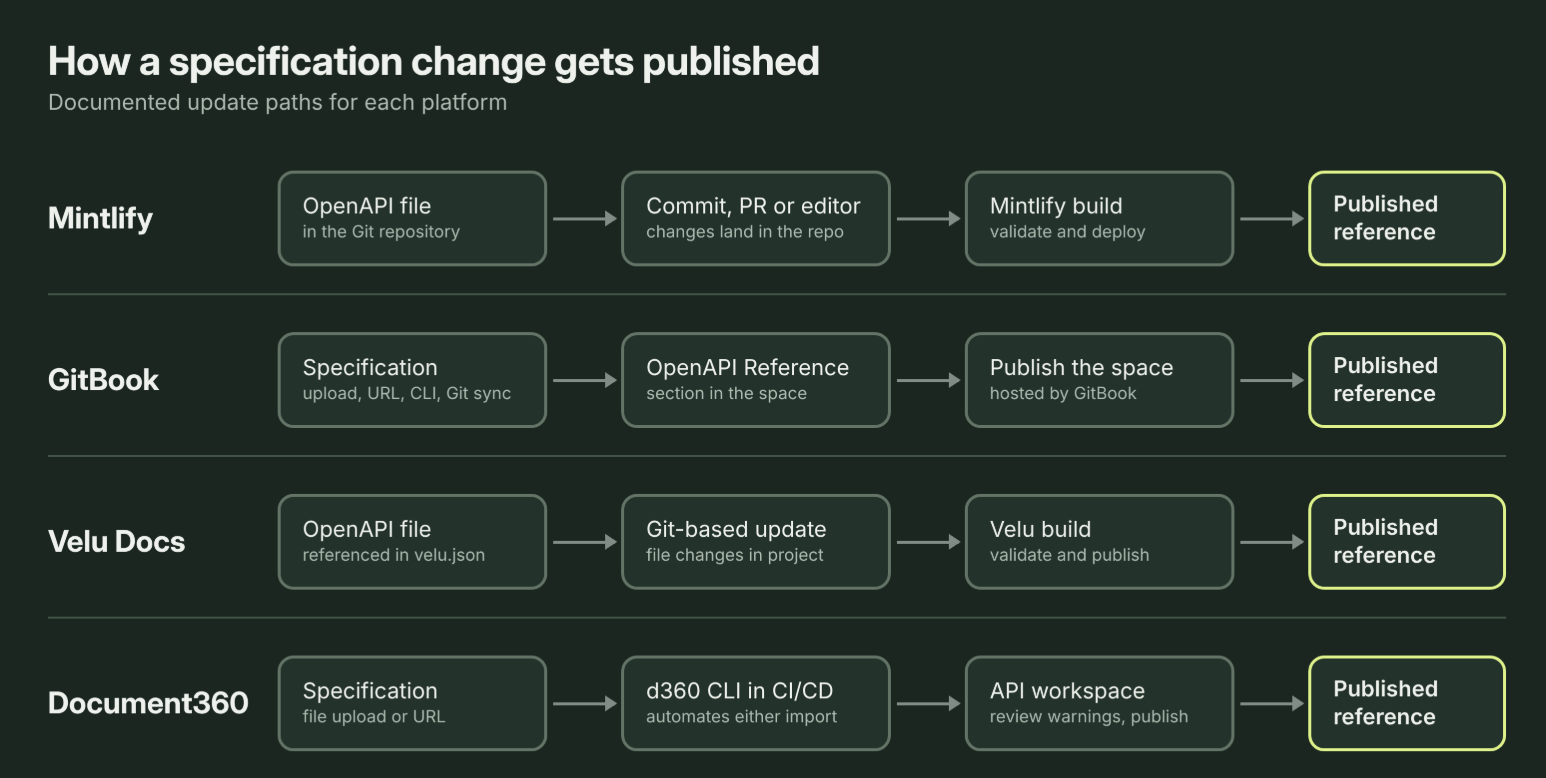
A few things are worth keeping in mind when reading the table.
- First, support for an interactive playground does not mean an API is automatically ready to test. The specification needs a valid server URL and the correct security configuration. The target API environment also needs to be reachable. A playground gives developers a way to send requests; it does not replace a working staging environment.
- Second, accepting an OpenAPI file is not the same as having an automated publishing process. A manual upload may be fine for an API that rarely changes. If the specification changes with every release, the team needs a repeatable way to validate and publish those changes.
- Third, AI access deserves a separate evaluation. Mintlify, GitBook and Document360 document MCP connections for compatible AI assistants. Velu describes MCP and machine-readable outputs. These connections can help Cursor or Claude Code search and retrieve documentation during a coding task.
- A documentation MCP server of this kind searches and reads the docs, though. Mintlify's included server, for example, does not call the API itself. An MCP connection also does not guarantee that an assistant will choose the right page, understand an incomplete specification or generate correct code. Test retrieval with real developer questions before making MCP support a deciding factor.
Pricing: What does API documentation actually cost?
Pricing can change the comparison considerably here and just comparing the entry price of each product can be misleading. A plan may include AI assistants, analytics, access controls or collaboration features that a team does not need just to publish an API reference.
The prices below are the public prices listed on the vendors' websites on November 19, 2026. They are in US dollars. Check the pricing pages before purchasing because prices and plan limits can change.
| Platform | Public entry price | What to know about API documentation |
|---|---|---|
| Mintlify | Free: $0/month | The Free plan includes Git sync, custom domain, authentication, MCP server and API playground for up to five editors. Pro is $450/month with annual billing or $540/month with monthly billing. |
| GitBook | Free: $0/site/month | Free includes interactive API playgrounds. Essential starts at $65/site/month plus $12/user/month. Ultimate starts at $249/site/month plus $12/user/month. Paid prices are based on annual billing. |
| Velu | Forever free: $0/month | The free plan includes API reference from OpenAPI, the playground, CLI, MCP and Git sync. Begin is $9/month ($90/year) and Value is $49/month ($490/year). |
| Document360 | Custom quote | API documentation is available on paid plans. One API workspace is included; additional workspaces cost extra. |
Mintlify: The API playground doesn’t need Pro
The Free plan covers up to five editors and includes the API playground, Git sync, a custom domain, authentication and an MCP server.
Pro costs $450 per month with annual billing, or $540 with monthly billing. It adds unlimited editors, an assistant, a writing agent, Autopilot and preview deployments. None of these are required to generate an API reference from OpenAPI.
For API documentation alone, start with the Free plan. Upgrade when a specific Pro feature solves a real requirement.
GitBook: Free to start, then per site and per user
The Free plan includes interactive API playgrounds and GitHub or GitLab sync.
Paid plans charge for each site and for each user, with annual billing. Essential, which GitBook previously called Premium, costs $65 per site per month plus $12 per user. Ultimate costs $249 per site per month plus the same $12 per user.
With five paid users, one site costs $125 per month on Essential and $309 on Ultimate. The upgrade is mainly about branding, publishing and collaboration, not the API reference itself.
Velu Docs: Low cost and high value
Velu lists three plans: Forever free at $0, Begin at $9 per month ($90 per year) and Value at $49 per month ($490 per year). The free plan already includes API reference documentation generated from your OpenAPI file, the playground, the CLI, MCP and Git sync, so the full API workflow costs nothing to start. The paid plans add features such as a custom domain, reader-facing AI answers and automated documentation updates.
Document360: ask for a quote
Document360 prices are quote-based. API documentation requires a paid plan, and each paid plan includes one API workspace. Additional workspaces cost extra.
Which platform should you choose?
The comparison does not point to one winner for every API team. It points to different strengths, depending on how the team works.
Choose GitBook for the quickest start in the browser UI
GitBook was the easiest platform to integrate in this test. Uploading the YAML file and generating the OpenAPI Reference section produced the expected endpoint and model pages without setting up a separate project first.
That makes it a good option for teams that want to get an API reference online quickly. The free plan also includes an API playground and Git Sync, so a team can evaluate the core experience before paying for a branded team site.
Choose Mintlify when the repository is the starting point
Mintlify is a natural fit when the API contract already lives in Git and the team wants documentation updates to follow the same process. A repository-first workflow is not exclusive to Mintlify, since GitBook and Velu offers Git Sync too, but it was the more natural starting point in this test.
The OpenAPI file stays in the repository, the site configuration points to it and the documentation build generates the reference. That makes it easier to connect updates to a release workflow, watcher or automation process. Contributors who prefer a browser can use Mintlify's web editor, which commits back to the same repository.
Evaluate Velu as another configuration-led option
Velu is worth considering when the team wants a workflow similar to Mintlify's and wants to compare the generated pages, AI outputs and plan costs before deciding.
Its OpenAPI configuration supports a Git-oriented workflow. Its MCP and machine-readable outputs are comparable in kind to what Mintlify and GitBook offer at a very low cost.
Evaluate Document360 when API reference is part of a governed portal
Document360 has a dedicated API workspace and documented support for OpenAPI and Postman imports, URL synchronization, CLI-based CI/CD and an interactive Try It console.
That makes it relevant to organizations that need API reference content within a larger portal with controlled reader access and publishing.
What an API documentation platform cannot do for you
Generating endpoint pages is only one part of API documentation. An OpenAPI specification can describe paths, methods, parameters, request bodies, responses, schemas and security schemes. It does not automatically explain why an endpoint exists, how an integration should be designed or which sequence of calls a developer should make to complete a task.
Take the Notes API used in this comparison. A developer may need to obtain a token, create a session, end that session and retrieve the resulting note. The endpoint pages describe those individual operations. A guide needs to explain the workflow as a whole and the decisions the developer needs to make along the way.
That distinction matters even when a platform generates an excellent API reference. The generated pages are the reference layer and they do not replace conceptual guides, tutorials or task-based examples.
There are a few other limits to keep in mind:
- The specification still needs to be correct. If the OpenAPI file has the wrong required fields, response codes or authentication scheme, the generator can reproduce those mistakes accurately.
- Examples need to reflect real API behavior. Generated examples are only as useful as the examples and schemas in the source contract. Review them against actual API responses.
- A playground needs a working environment. A Try It button will not fix a placeholder server URL or an unavailable staging API.
- Import support is only the first step. Teams still need to decide when the specification is published, how changes are validated and what happens when an import fails.
- Custom explanations need a maintenance plan. If writers add content around generated operations, they need to know whether that content survives regeneration and how conflicts are handled.
A documentation platform can make an API reference easier to generate, publish and maintain. It cannot replace a reliable API contract or thoughtful developer guides.
The verdict
After using the same Notes API contract across these four platforms, the choice comes down to the team's workflow rather than a universal winner. GitBook was the quickest way to go from a file to a published reference in the browser, and Mintlify was the most natural fit when the repository is the starting point. Both also support the other route, through Git Sync in GitBook and a web editor in Mintlify.
Velu is worth a trial because its workflow is close to Mintlify's and its paid plans start at $9 and $49 per month, and Document360 when a governed portal is a real requirement. For a small API team, I would start with Velu or GitBook as they are easy, free and low price.
In the end, the decision comes down to three things: the quality of the generated reference, the effort required to keep it in sync with the API and the cost of the plan the team actually needs.
About the author
- I’m Harshit Satyaseel, a documentation engineer with 7+ years of experience building developer documentation at TIBCO, Confluent and Suki.AI. I own the developer docs end-to-end, from API and SDK references to docs-as-code pipelines, automation and AI-ready documentation. I’m the author of The AI-Native Technical Writer, and I write about documentation, AI workflows and technical writing careers on Medium, including Level Up Coding. I also mentor technical writers 1:1 on careers, interviews and using AI well in their work.
Comments
Join the discussionNo comments yet. Be the first to comment.